
Best Monitor For Long Hours
Finding the Best Monitor For Long Hours is essential for anyone who spends significant time in front of a screen, whether you’re working from home, managing cybersecurity tasks, or engaging in video conferencing. A suitable monitor can enhance productivity and reduce eye strain, ensuring comfort during extended use. In this guide, we will explore the top monitors tailored for various professional needs, helping you make an informed decision.
Quick Picks (Top 3)
For a quick overview, here are our top recommendations for the best monitors for long hours:
- Best overall pick: Samsung 27″ Essential S3
- Best value pick: Philips 271V8LB 27″ Framless Full HD 100Hz
- Best premium pick: Samsung 27” Borderless Business
Top 5 Products for Best Monitor For Long Hours
Samsung 27″ Essential S3 Series FHD 1800R Curved Computer Monitor
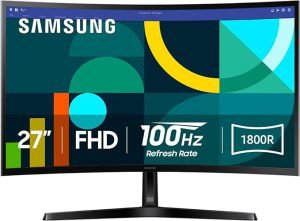
The Samsung 27″ Essential S3 Series monitor is designed for long hours of use, featuring a 1800R curved screen that enhances immersion and reduces eye strain. Its Full HD resolution ensures crisp visuals, making it ideal for virtual assistants who juggle multiple tasks. The monitor’s sleek design and adjustable stand cater to ergonomic needs, promoting better posture during long work sessions.
- Why it stands out: Curved design for an immersive experience
- Best for: Virtual assistants and general office use
- Any trade-off: Limited color gamut compared to more premium models
Pros
- Immersive curved display
- Adjustable height and tilt
- Good price-to-performance ratio
Cons
- May lack advanced features
- Limited color accuracy
Philips 271V8LB 27″ Framless Full HD 100Hz Monitor
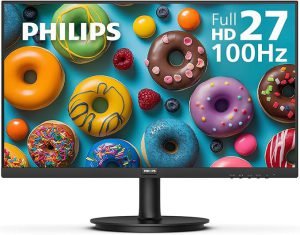
For professionals seeking a seamless look and feel, the Philips 271V8LB monitor boasts a frameless design and 100Hz refresh rate, ideal for video conferencing and multitasking. Its vibrant colors and clear image quality cater to cybersecurity professionals who need precision in their work. Enhanced low blue mode technology helps reduce eye fatigue, making it a great choice for long hours.
- Why it stands out: Frameless design for a modern aesthetic
- Best for: Cybersecurity professionals and gamers
- Any trade-off: Limited connectivity options
Pros
- High refresh rate
- Excellent color reproduction
- Low blue light feature
Cons
- Less versatile ports
- Not the best for graphics work
Samsung 27” Borderless Business Monitor with IPS Panel
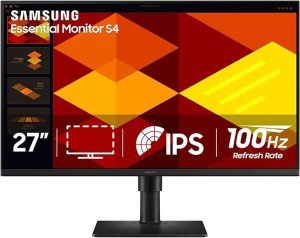
This Samsung monitor offers a borderless design combined with an IPS panel, providing consistent colors and wide viewing angles, perfect for split-screen work. It is especially suitable for professionals needing to keep several applications visible simultaneously. The ergonomic stand and eye-saver mode ensure comfort during long working hours, making it a top pick for those working from home. Samsung 27” Borderless Business Monitor with IPS Panel is a practical choice for buyers looking for reliable Best Monitor For Long Hours performance with balanced daily usability and long-term value.
- Why it stands out: Excellent color consistency
- Best for: Split-screen work and productivity
- Any trade-off: Slightly higher price point
Pros
- Wide viewing angles
- Great color accuracy
- Ergonomic design
Cons
- Higher cost compared to basic models
- May require calibration
BenQ GW2490T Computer Monitor 24″ 100Hz FHD 1920x1080p
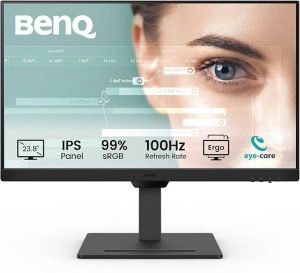
The BenQ GW2490T monitor is a compact option that doesn’t compromise on performance. With a 100Hz refresh rate and Full HD resolution, it’s perfect for video conferencing and day-to-day tasks. The built-in brightness intelligence technology adjusts the screen according to ambient light, making it easier on the eyes during long hours, especially for remote workers. BenQ GW2490T Computer Monitor 24″ 100Hz FHD 1920x1080p is a practical choice for buyers looking for reliable Best Monitor For Long Hours performance with balanced daily usability and long-term value.
- Why it stands out: Compact yet powerful
- Best for: Video conferencing and home office tasks
- Any trade-off: Smaller screen size
Pros
- Brightness intelligence technology
- Compact design for small spaces
- Affordable price
Cons
- Limited screen real estate
- Basic stand adjustments
CRUA 34 Inch Ultrawide Curved Monitor
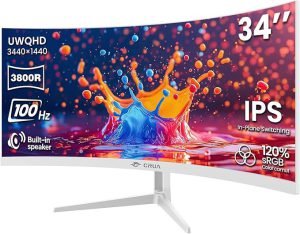
If you’re looking for a more expansive workspace, the CRUA 34 Inch Ultrawide Curved Monitor offers ample screen real estate for multitasking. Its ultrawide display is perfect for split-screen work, allowing you to run multiple applications side by side without any hassle. The curvature of the monitor helps reduce distortion and increases immersion, making it a superb choice for any professional needing extensive screen space.
- Why it stands out: Massive ultrawide display
- Best for: Professionals needing extensive workspace
- Any trade-off: Requires more desk space
Pros
- Extensive screen space
- Immersive curve
- Great for productivity
Cons
- Takes up significant desk space
- Higher price point
Comparison Snapshot (price, performance, value)
When evaluating the Best Monitor For Long Hours, it’s essential to consider factors like price, performance, and overall value. Each product reviewed fits specific needs and budgets, ensuring you find the right monitor to enhance your productivity without sacrificing comfort.
Buying Guide (how to choose)
Choosing the Best Monitor For Long Hours involves assessing your specific needs, including screen size, resolution, refresh rate, and ergonomic features. Look for monitors with adjustable stands and eye-care technologies to ensure comfort during extended use. Understanding your primary use-case—be it video conferencing, cybersecurity tasks, or general office work—will further guide your selection.
Final Recommendation
Ultimately, the Best Monitor For Long Hours will depend on your personal preferences and professional requirements. We recommend considering the Samsung 27″ Essential S3 Series for its balance between performance and price, particularly for virtual assistants and general office use. However, if your work demands more screen space, the CRUA 34 Inch Ultrawide Curved Monitor is an excellent choice for multitasking.
Frequently Asked Questions
These quick answers cover the most important points readers usually ask about.
Q1 What should I look for in a monitor for long hours?
Look for features such as adjustable stands, blue light filters, and ergonomic designs to reduce eye strain and improve comfort during extended use.
Q2 Are curved monitors better for long hours of work?
Curved monitors can provide a more immersive experience and reduce glare, making them potentially better for long hours, especially for multitasking.
Q3 How does screen size affect productivity?
A larger screen size can enhance productivity by allowing more applications to be visible simultaneously, particularly beneficial for split-screen work.
Q4 Is it worth investing in a higher refresh rate monitor?
A higher refresh rate can make for smoother visuals and less eye strain, especially beneficial for video conferencing and gaming.
Q5 What does Best Monitor For Long Hours mean in simple terms?
Best Monitor For Long Hours is a practical topic that becomes easier once you understand the core concept and how it applies in real situations.





